Posts

Showing posts with the label Banglarshiksha portal help

Marks entry in Banglar shiksha SMS portal and server problem

Image
  State Education Department has extended the deadline for Model Activity Compilation (Final) 2021 marks entry on Banglar shiksha SMS portal. Marks of final activity task of Banglar shiksha e-portal from class I to class IX have been extended by one week. December 15th was the last day to upload student numbers. Which has been increased to 23 December by the school education department. Teachers were repeatedly complaining that they were having difficulty in entering marks due to server down of sms portal. Although the deadline for entry of marks in the SMS portal has been extended, but still no teacher is able to login to the SMS portal. As a result, they are not able to enter marks in the SMS portal. It is not yet known from the education department how long it will take to solve the problem of the portal. The Department of Education has directed all the schools to promote or detain the students of Banglar shiksha e-portal for the server problem of SMS portal. And can gen...
UC for Taruner Swapna in banglar shiksha portal

Image
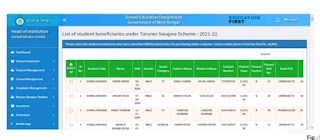
  Guidelines for certification by HoI with regard to collection of the photocopy of Bill/Voucher/Invoice for purchasing tablet computer / smart mobile phone under ‘Taruner Swapna’ Scheme . Click here to Download. Step-1:  Login to the HoI level   go to ‘Student Management’ menu   click on ‘UC for Taruner Swapna’ sub-menu.  By default, no student beneficiary would be selected in the check box at the extreme left. You may click on the check box to select any student who has submitted the duly signed photocopy of Bill/Voucher/Invoice for purchasing a tablet computer / smart mobile phone of not less than Rs. 10,000/-.  All student beneficiaries may also be selected at once by clicking on the ‘select all’ button available at the top left column of the table. Following screen would appear in this regard. Step-2:  After selecting the students who have submitted the duly signed photocopies of Bill/Voucher/Invoice for purchasing tablet computer /...

Infrastructure Survey and School Uniform Survey in Banglar Shiksha Portal

Image
  All schools in West Bengal are still closed due to the pandemic. Hon'ble Mamata Banerjee had recently announced that all schools would be reopened after the Puja holidays. The Education Department has taken initial steps to make this announcement of Hon'ble Mamata Banerjee a success. The Department of Education has added two modules to the Banglar Shiksha Portal for the purpose of opening schools. These modules are Infrastructure Survey and School Uniform Survey. Purpose of Infrastructure Survey in Schools: Schools have been closed for a long time. There have been many natural disasters during this period. As a result, many school infrastructure has been damaged. This survey is very important for the purpose of repairing the infrastructure. Cvd situations are still present in the state. Therefore, this survey is very important for the schools to be started in compliance with the health rules. Guidelines for providing information on school reopening through BANGLAR SHIKSHA Por...

Delete or deactivate a student from Banglar shiksha portal

Image
A new module has been added to Banglar Shiksha e-Portal. This new module is called "Delete Student". This module can be used to delete / deactivate a student's ID. In which cases can the "Delete Student" module be used? Duplicate : If a student enters the Banglar Shiksha Portal more than once, the school will have to delete the duplicate id by keeping the correct ID Wrongly Uploaded :  Id is generated with wrong information during data entry of a student in Banglar Shiksha Portal, then the Id of that student has to be deleted or Deactivated. Died:   If a student dies, the student's Id must be deleted or deactivated. How to delete or deactivate a student's Id from Banglar shiksha portal? First you have to login to Banglar Shiksha portal (HoI). Click on the "Delete Student" option located in the 'Student Management' of the Navigation menu. The student whose Id is to be deleted or deactivated, type the Id of that student and click...

Finalization of Beneficiary of Banglar Shiksha Portal

Image
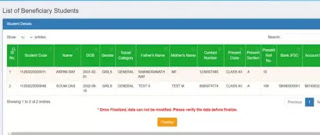
Login to HOI level and go to ‘Finalization of Beneficiary & Certification’ Sub menu under  ‘Student Management ' Menu, the following screen shot has been displayed for this purpose. After verifying the beneficiary list, click on ‘Finalize’ button to freeze the data. Click on ‘OK’ button to ensure that you want to finalize the beneficiary list. It is noted that if the data is finalized once, that cannot be modified afterwards. The following screen shot has been displayed for this purpose. After clicking on ‘OK ‘ button a message will be generated stating that the beneficiary details have been successfully submitted. Following screen shot reflects the same. To download the beneficiary list in excel format, click on ‘Excel Download’ button. Click on ‘Download Certificate Format’ button to avail the beneficiary list and the certificate of the HoI in PDF format. Such a format will be generated as depicted below. After downloading the certificate format, the same is to ...

Transfer Out and Transfer in Banglar Shiksha Portal

Image
Transfer out in Banglar Shiksha Portal When a student from one school wants to be admitted in another school, it is mandatory to get a transfer certificate from Banglar Shiksha Portal. Otherwise, the student will not be able to get admission in any government school. So here I will show how to generate TC by transferring a student from Banglar Shiksha Portal. Process of Transfer out in Banglar shiksha portal. First you have to login to Banglar Shiksha e portal. Click on " Student Management " in the Main Navigation bar. Click on " Student Transfer out " option under Student Management. Type the ID of the student who will take TC from the school in the Student Code bar of the " Student Transfer out " page and click on " Search Student ". Next, click on 'Transfer out' with the correct reason and Date of leaving on the Select Transfer Details page. How to Download the Transfer Certificate from Banglar Shiksha Portal After the ...