Posts

Showing posts with the label Banglar Shiksha School Website Design

Banglar Shiksha School Website Creation

Image
The government of West Bengal has directed to open its own Website in the  Banglar Shiksha Portal to bring every  School under the same School Management System . Through this  Website, students will have the benefit of education and administrative work. What you need to do to open this Website, how to  upload a photo and write description, what is size and format of logo for new website is described Step by Step, if necessary, you can download the PDF of User manual. Below is an idea of how to work on the Website Content of the Banglar Shiksha School Management System (SMS) Portal. Banglar Shiksha School Management System (SMS) Portal's Website Content to upload all the photos or all the information that you write will be seen on the School Management System (SMS) Portal's Website's Landing Page, that is, on the Website's Homepage. Below is just a preliminary idea to help you get the job done. Banner on Banglar Shiksha School...
Write a notice on Banglar Shiksha School Website

Image
Each school has a website on the Banglar Shiksha portal. Initially most of this website is not designed. The school authorities have to design this website. How to access the Banglar Shiksha school website? Step 👇 🔴 Login with School to Banglar Shiksha SMS Portal. 🔴Click on the "View Website" option at the top of the dashboard. This blog is about How to add a Notice Content to Banglar Shiksha school website. Step 👇 🔴Click on the " website content " option in the Navigation menu. 🔴Click on the " Notices "  option in the " Website Content "  option. 🔴A new window will open. Click on " Add New ". 🔴A new window will open. Follow the image below, fill in the description box and upload the image. What you write in this description box will be shown on the Banglar Shiksha school website. How to access notices on Banglar Shiksha school website? 🔴 Click to "View Website"...

Overview on Banglar Shiksha Website

Image
Each school has a website on the Banglar Shiksha portal. Initially most of this website is not designed. The school authorities have to design this website. How to access the Banglar Shiksha school website? Step 👇 🔴 Login with School to Banglar Shiksha SMS Portal. 🔴Click on the "View Website" option at the top of the dashboard. This blog is about how to add an Overview Content to Banglar Shiksha school website. How to add an Overview content on Banglar Shiksha School Website? Step 👇 🔴Click on the "website content" option in the Navigation menu. 🔴Click on the "Overview"  option in the "Website Content"  option. 🔴 A new window will open. Click on "Add New". 🔴 A new window will open. Enter the description as instructed in the image below.What you write in this description box will be shown on the Banglar Shiksha school website. You can follow the YouTube video below about this blog. Click...

Banner on Banglar Shiksha website

Image
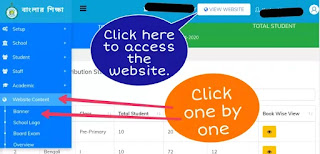
Each school has a website on the Banglar Shiksha portal. Initially most of this website is not designed. The school authorities have to design this website. How to access the Banglar Shiksha school website? Step 👇 🔴 Login with School to Banglar Shiksha SMS Portal . 🔴Click on the "View website" option at the top of the dashboard. How to create a banner on Banglar Shiksha portal? I have already published a blog on how to add a logo to the school website of the Banglar Shiksha portal. This blog is about how to add a Slider or Banner to Banglar Shiksha school website. Step 👇 🔴 Login with School to Banglar Shiksha SMS Portal. 🔴Click on the "website content" option in the Navigation menu. 🔴Click on the "Banner"  option in the "Website Content"  option. 🔴A new window will open. Click on "Add New". 🔴A new window will open. Type Title. Type Subtitle. Upload Content. #Photo size- 30...