Very important website for every teacher. In this website, we publish help for teachers regarding Banglar shiksha portal(Banglar shiksha sms portal and Banglar shiksha CP), iOSMS portal, news of teacher transfer (iOSMS online Mutual Transfer, Online General transfer, Home district transfer) Madhyamik exam, Higher Secondary, Primary Tet exam, Teacher requirment SSC News, Upper primary tet exam, ctet, Udise portal, and other educational issues.
PROMOTION DETENTION and School Leaving Certificate for CLASS X TO XII
Get link
Facebook
X
Pinterest
Email
Other Apps
Student Promotion Detention academic year 2022
Watch this video 👇
i) It is available in HOI log in (Banglar Shiksha e- portal
ii) This tab is given under Student Management Menu
iii) It cannot be done if
Student’s image is not uploaded earlier
*remedy → upload Student’s image/specify the reason for not having image and deactivate the Student.
promotion detention is not done for 2021
*remedy →do it first under Student
Management Menu.
Student’s parents name is not updated.
*remedy → update the same from Update Student Basic Details tab under Student Management Menu.
promotion detention process
click on "Student Promotion Detention" under Student Management Menu.
Do Student Promotion Detention from Higher Class to Lower Class .
(e.g., if the Highest Class of the School is Class IV, do it as Class IV → Class III → Class II → Class I → PP)
If there is no student in any Class → ‘Not Applicable’ is shown against this Class after clicking on Student Promotion Detention
After completion of promotion detention
At the TERMINAL CLASS, TC/SLC (School Leaving Certificate) will be generated in bulk (in pdf)
If any rectification needed in respect of any student after generation of TC/SLC, update the required fields for the concerned student using "Update Student Basic Details" under Student Management and regenerate the TC/SLC. Then it will be available in corrected form.
___________________________________
___________________________________
USER MANUAL OF PROMOTION / DETENTION MODULE FOR CLASS X TO XII
STEP -1:
Select Class under Student Management > Student Promotion Detention
Login to HOI Level and go to Promotion/ Detention module under Student Management. The following screenshot has been displayed.
Class :- Class are displaying from Class V to Class XII.
Status:- At first, Status is showing Pending (for Classes X to XII).
Action: - Under action table button has been given (for Classes X to XII), Click Submit to proceed.
STEP - 2:
Select Students who appeared (allowed) for MP / HS Examination.
If the Student is not allowed to appear at MP/HS Examination, Click check box (✓) under "Detained" and send him/her back to Class X or XII (as the case may be) and assign Section & Roll No as per school record in the class.
"Allow Test" is selected by default. Finally click "Save as Draft" at bottom of the list.
STEP - 3:
Finalize Draft (Sent-Up Students)
Please take care
An allowed student (for MP/HS Exam) not marked as "Detained" i.e not allowed, else Click Finalize.
STEP-4:
Provide MP/HS Result
After finalizing Test Examination Status (Allowed/ Not allowed for final exam), click Submit to provide result of final examination (MP/HS).
STEP-5:
Provide MP/HS Result
For a successful student in MP/HS Examination (Select Promoted and provide marks obtained as per Board/Council marksheet), if unsuccessful, select Detained. A detained student will be treated as "Sent up" for next MP/HS exam.
Finally, click "Save as Draft". Please check whether the marks entered is at per with the MP/HS mark sheet, as this mark will be printed on School Leaving Certificate.
STEP-5:
Finalize Draft (MP/HS Result)
STEP-6:
Download School Leaving Certificate (bulk)
After finalizing MP/HS result, "Download School Leaving Certificate" button will appear. The HOI can download
School Leaving Certificate of all successful students (bulk) in a single pdf file for distribution to students at the
time of distribution of Mark Sheet & certificates.
The acknowledgement part below the School Leaving Certificate to be signed by student/guardian and to be
retained by the school.
Under no circumstances this certificate to be given to student/guardian more than once. Download PDF
Update Board Exam result on Banglar Shiksha portal
If a student's board exam result is incorrect entry in the student leaving certificate, then it can be corrected and the school leaving certificate can be made again.
You have to do this on Banglar Shiksha portal. The procedure is given below ....
1.First open the Banglar Shiksha e-portal.
2.Click the "Student Management" option in the Navigation menu.
3.Click on the "Update Board Exam result" located in "Student Management" option.
4.A new page will open.Search by typing the student code here.
5.Enter the correct exam result of the student here and click on "Update details".
____________________ You can join our Whatsapp group-1 or group-2 to get instant updates. Subscribe to my blog to find out more information. Like my facebook page Follow YouTube
New Module Mark entry process in Banglar shiksha SMS portal Prerequisite For Marks entry in Banglar shiksha portal Please check the medium(s), which is/are showing in the Medium dropdown in Marks Entry page from Hol login. If there is/are any improper medium(s), please select that/those medium(s) (one by one) and then select the class, section, subject (any) and click on Search button; student's/students' name will be available in the list against the particular medium. Please change the medium of instruction of the student(s) concerned from e-Portal (through 'Update Student's Basic Details' / 'Student's Profile Edit / Download sub-menu under 'Student Management' menu in Hol login) Then click on 'Update Student Details' to synchronise students' information in the SMS portal.If required data is updated in e-Portal, that would also be updated in SMS Portal in this way. LOGIN Banglar shiksha SMS Portal HOI / Teacher can login from here ...
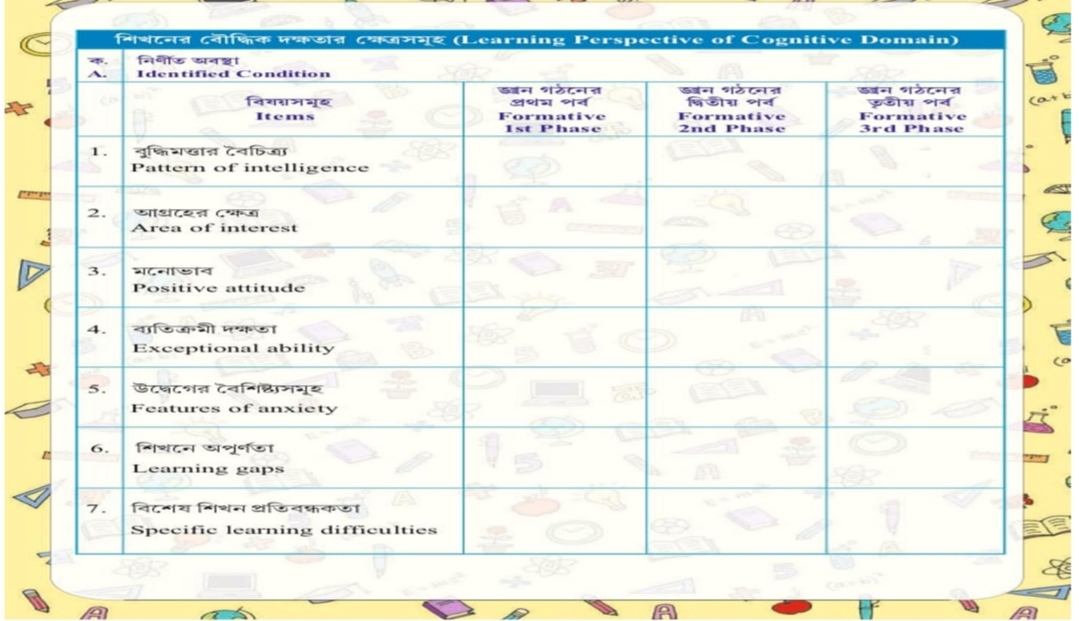
Learning Perspective of Cognitive Domain Holistic Report card এর একটি গুরুত্বপূর্ণ মডিউল হলো Learning Perspective of Cognitive Domain । এর 7টি অংশ - 1. Pattern of Intelligence 2. Area of Interest 3. Positive attitude 4. Exceptional ability 5. Features of anxiety 6. Learning Gap: Identified in academic content 7. Specific learning difficulties প্রতিটি অংশে প্রতি Formative phase এর জন্য প্রতিটি শিক্ষার্থীর জন্য যথাযথ ও যথার্থ মন্তব্য উপস্থাপন করতে হবে। আমি draft of Holistic Report card, HPRC training, Chatgpt এবং নিজের অভিজ্ঞতাকে সংমিশ্রণ করে, Learning Perspective of Cognitive Domain পূরনের একটি মডেল তৈরি করেছি।……….. এইটি শিক্ষা দপ্তর থেকে প্রকাশিত কোনো draft নয়…. M.Haque Pattern of Intelligence Note Holistic Report card এ remarks ব্যাখ্যা N.B- Gardner's Theory of Multiple Intelligences: হাওয়ার্ড গার্ডনার একজন উন্নয়নমূলক মনোবিজ্ঞানী যিনি পরামর্শ দিয়েছিলেন যে মানুষ একাধিক উপায়ে বুদ্ধিমান হতে পারে।গার্ডনার আটটি বুদ্ধিমত্তা চিহ্নিত করেছেন। হাওয়ার্ড গার্ডনারের ...
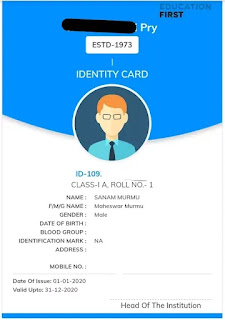
I-card for school students in West Bengal I-card can be made for the students of West Bengal at Banglar Shiksha Portal. This I-card is very necessary for the students. The school where the student is studying generates I-card from Banglar Shiksha portal.This I-card is given to students for free. Login to Banglar shiksha sms portal Enter the site 👈click here Please select role-(HOI/Teacher/staff) or school Username-Class Teacher unique ID /School ID Password-*********/******** Type captcha Click ->login Download I Card on Banglar shiksha sms portal Step 1- Click- 3line left corner bar. The navigation bar will open. Step 2- Click -> "Student"option under the Navigation menu. Step 3- Click->Student profile under student option. A new window will open. Step 4- Choose Medium, Select class & section Click->Search Step 5- See Action column ->There are three square, click on the last square.(per student)
The applicant should go to ‘https://osms.wbsed.gov.in’ or https://banglarshiksha.gov.in/utsashree/page/intra_ehrms/teacher_transfer_sec/teacher_transfer_login.php to submit his application for transfer. Online General Transfer process on Utsashree Portal (Primary School Teacher) The steps required to login to the system mentioned below – OSMS Type – PRIMARY for primary school teacher. After selecting OSMS Type then the applicant selects his/her school’s district and circle from drop down menu. Then he/she can enter his/her unique ‘8 Digit’ employee code. After that the applicant will be able to give his PAN number. He/ She needs to enter the captcha code for security reasons. After verifying all the data, he will get an OTP in his registered email & mobile. After submitting the OTP to the system, the applicant can successfully log into the system for transfer. After successfully login he can view the dashboard . In the Dashboard...
Teacher Profile edit in iOSMS. According to the circle level, each permanent teacher will have to edit the profile on the iOSMS portal, otherwise they will face difficulties in May 2020 salary.So each teacher has edited their profile on iOSMS portal as per requirement. Although the profile of teachers in iOSMS has changed, the profile in Banglar Shiksha e-portal has remained unchanged. How will the new data of iOSMS profile synchronize to the Banglar Shiksha e-portal? Teacher profile update in Banglar Shiksha e-Portal. Before that we need to know which method the portal has instructed to adopt in this regard. A few days ago I mailed to the Banglar Shiksha e-portal to know about this, I shared that reply to you. However, I described according to the reply of the above mail. The method of synchronization is described below. School Login to Banglar Shiksha E- Portal. 👈 Click here 🙏Hit on " Employee Mgmt " under the main Navigation menu. 🙏Hit on...
Primary schools in West Bengal were closed for a long time. From 16th February all the primary schools in West Bengal were reopen. The role of class routine in conducting classes in school is immense. Class routine from pre-primary to fifth class is uploaded here. Class routine of pre-primary Class routine of Class I and Class II Class routine of Class III Class routine of Class IV Class routine of Class V Class routine for morning session
The West Bengal state government inaugurated a new scheme 'Utshasree' for teachers. Hon'ble Chief Minister Mamata Banerjee announced the new scheme on Thursday (22/07/2021). She said the decision was taken at a cabinet meeting. On the same day, the Chief Minister said, the state is launching a portal called Utsashree. Teachers can apply through this portal if they want to transfer to a school near their home. She did not say when the scheme would be launched. She said, " Utsashree scheme is being launched for teachers. For those who want to transfer to their district or near home. But if ten teachers want to transfer to one place, it is not possible. It has to be adjusted. As I said before, teachers don't have to go far to work.. A portal is being launched to transfer at least as close to their home as possible, where teachers can apply for the transfer themselves. The Department of Education will take action accordingly. ……….. " Many teachers want ...
A few days ago I did a post about 👉UDISE + . At present UDISE + School login is available on Banglar Shiksha Portal. In this blog I will give details about UDISE + login.How to login Udise plus for school? How to entry online Udise data? How to login Udise plus to Banglar Shiksha Portal? All were informed earlier that the UDISE-2019 related works to be done through online mode in Banglar Shiksha e-portal as per the availability of the link.Now, All the HOIs are hereby informed that the UDISE+ application link has been made ready by NIC (as on 11.05.2020) for final deployment to facilitate the end user for online Data Entry. Now data entry to be made by School Level user from 2 PM on 11.05.2020. Entry of data for School Management Code 1& 15 should be accessed the site through Banglar Shiksha portal ( https://www.banglarshiksha.gov.in ),otherwise there may be loss of data during finalization. Open 👉 Banglar Shiksha Portal 👈 Click here Hit on 👉 "Click h...
UDISE+ 2023-24 Login Details for different Users in UDISE Plus 2023-2024 Portal Udise plus application is now available for the year 2023-2024. URLs are as below: http://schoolinfo.banglarshiksha.gov.in For all Users, default Password is : @School#2024@ ( Recommended to change default password after 1 st successful Logged in ) For School HOI Default User Id and Password is as below: User Id : School Code + 33( total 13 digits ) Password : @School#2024@ ( e.g. School Code : 19070206202 + 33 then User Id = 1907020620233 ) For Block MIS Default User Id and Password is as below: User Id : Block Code + 06 Password : @School#2024@ ( e.g. Block Code : 191101+ 06 then User Id =19110106 ) For Circle MIS Default User Id and Password is as below: User Id : Circle Code + 09 Password : @School#2024@ ( e.g. Circle Code: 190109+ 09 then Use...
Those enrolled in the Teacher Training Course (TTC) are eligible to appear in the TET examination There is no compulsion to appear in the final year or TET exam result. Any such student admitted to a teacher training course will be considered in the 'PURSUING' category. NCTE has issued a notification citing the order passed by the Supreme Court. Till now students were considered eligible to take the TET exam only when they reached the final semester / year. That rule is changing, though. From now on you can sit for the TET exam only after enrolling in the course. When this was litigated in the Supreme Court, the Supreme Court gave a broader interpretation to the term 'PURSUING'. NCTE issued this notification after this. Now students can take TET only after enrolling in teacher training course. Earlier, the Uttar Pradesh government in their TET exam notification said that those who are undergoing training can apply for the TET exam. But th...





Comments
Click👉 Banglarshiksha e-portal
Click👉 Banglarshiksha sms-portal
Contact no……..
Banglarshiksha e-portal
📞+91 6289355392
Banglarshiksha sms portal -
📞+91 6289352676
Mail to…..
Banglarshiksha e-portal
📤contacteportalwb@gmail.com
Banglarshiksha sms portal
📤contactschoolmanagementsystem@gmail.com