Posts

Teacher Profile update in Banglar Shiksha Portal

Image
Teacher Profile edit in iOSMS. According to the circle level, each permanent teacher will have to edit the profile on the iOSMS portal, otherwise they will face difficulties in May 2020 salary.So each teacher has edited their profile on iOSMS portal as per requirement. Although the profile of teachers in iOSMS has changed, the profile in Banglar Shiksha e-portal has remained unchanged. How will the new data of iOSMS profile synchronize to the Banglar Shiksha e-portal? Teacher profile update in Banglar Shiksha e-Portal. Before that we need to know which method the portal has instructed to adopt in this regard. A few days ago I mailed to the Banglar Shiksha e-portal to know about this, I shared that reply to you. However, I described according to the reply of the above mail. The method of synchronization is described below. School Login to Banglar Shiksha E- Portal. 👈 Click here 🙏Hit on " Employee Mgmt "  under the main Navigation menu. 🙏Hit on...
UDISE+ Checker

Image
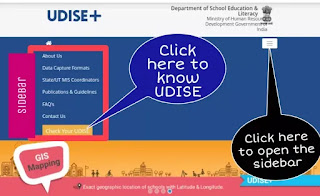
Each school has to submit DCF of UDISE+ every academic year.Each school has to complete and submit the DCF correctly.How do we check the data on UDISE PLUS website after submitting DCF? Check School UDISE+ Data Open UDise Plus Website. 👈 Click here Click on the 3-line menu. The sidebar will open. Hit on " Check your UDISE ". A new window will open. Fill in the items below. Select State…… Type UDISE code…… Type Captcha…….. Hit on "Submit". A New Window will open. Click on the arrow on the new page where the school name is. Clicking on the arrow will open all the data of the school. How to fill UDISE form 2019-2020 🔴Download DATA CAPTURE FORMAT   👈 Click here 🔴Print out. 🔴Fill in exactly. 🔴 Submit. UDISE Plus School Login. I will update this soon....... Subscribe to my blog to find out more information . Like my  facebook page Follow  YouTube

Bangla Newspapers। List of online Bangla Newspaper

Nowadays almost all people have a smartphone. We can read all the news paper news every day with the help of our smartphone. List of Bangla Newspaper If you click one by one on the colorful text below, you will enter the mentioned News paper site. Anandabazar Patrika Bartaman Patrika Aajkaal Patrika Sangbad Pratidin Ganashakti Ebela Eisamay BBC Bangla Bengal Today TDN Bangla Puber Kalom 12. NDTV Bangla List of Bangla News TV Channels 24 Ghanta ABP Ananda News 18 Bangla Kolkata TV Calcutta News LIVE 🔴 ABP Ananda 🔴 Kolkata TV 🔴News 18 Bangla 🔴 COVID-19 update 🔴 DD Bangla

Write a notice on Banglar Shiksha School Website

Image
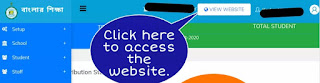
Each school has a website on the Banglar Shiksha portal. Initially most of this website is not designed. The school authorities have to design this website. How to access the Banglar Shiksha school website? Step 👇 🔴 Login with School to Banglar Shiksha SMS Portal. 🔴Click on the "View Website" option at the top of the dashboard. This blog is about How to add a Notice Content to Banglar Shiksha school website. Step 👇 🔴Click on the " website content " option in the Navigation menu. 🔴Click on the " Notices "  option in the " Website Content "  option. 🔴A new window will open. Click on " Add New ". 🔴A new window will open. Follow the image below, fill in the description box and upload the image. What you write in this description box will be shown on the Banglar Shiksha school website. How to access notices on Banglar Shiksha school website? 🔴 Click to "View Website"...

Overview on Banglar Shiksha Website

Image
Each school has a website on the Banglar Shiksha portal. Initially most of this website is not designed. The school authorities have to design this website. How to access the Banglar Shiksha school website? Step 👇 🔴 Login with School to Banglar Shiksha SMS Portal. 🔴Click on the "View Website" option at the top of the dashboard. This blog is about how to add an Overview Content to Banglar Shiksha school website. How to add an Overview content on Banglar Shiksha School Website? Step 👇 🔴Click on the "website content" option in the Navigation menu. 🔴Click on the "Overview"  option in the "Website Content"  option. 🔴 A new window will open. Click on "Add New". 🔴 A new window will open. Enter the description as instructed in the image below.What you write in this description box will be shown on the Banglar Shiksha school website. You can follow the YouTube video below about this blog. Click...

Banner on Banglar Shiksha website

Image
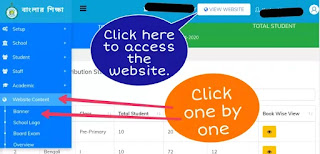
Each school has a website on the Banglar Shiksha portal. Initially most of this website is not designed. The school authorities have to design this website. How to access the Banglar Shiksha school website? Step 👇 🔴 Login with School to Banglar Shiksha SMS Portal . 🔴Click on the "View website" option at the top of the dashboard. How to create a banner on Banglar Shiksha portal? I have already published a blog on how to add a logo to the school website of the Banglar Shiksha portal. This blog is about how to add a Slider or Banner to Banglar Shiksha school website. Step 👇 🔴 Login with School to Banglar Shiksha SMS Portal. 🔴Click on the "website content" option in the Navigation menu. 🔴Click on the "Banner"  option in the "Website Content"  option. 🔴A new window will open. Click on "Add New". 🔴A new window will open. Type Title. Type Subtitle. Upload Content. #Photo size- 30...

E-Pension for Teacher of West Bengal

Image
A notice regarding e-pension has been published on the iOSMS portal of the Government of West Bengal.This notice mentions the method of how retired teachers will get the benefit of e-pension.I posted that notice below. Source: iOSMS In Text: E-pension urgent (A) FOR THOSE EMPLOYEES WHO ARE GOING TO RETIRE WITH PAY AS PER ROPA-2019 All Hols/Sls are requested to update the "PERSONAL DETAILS" and "CONTACT DETAILS" of those employees who are going to retire with pay as per ROPA-2019, Those fields are available in "EDIT EMPLOYEE PROFILE (AFTER FINALIZATION)" menu under "MASTER DIRECTORY MANAGEMENT" in i-OSMS. All the updated data will be fetched to e-Pension portal from i-OSMS. The applicant will login with his/her previous ID and password to proceed further. The work flow will remain same as earlier. (B) For those employees who have retired/ died between 01/01/2016 to 31/12/2019 with e-PPO and have User ID and Password f...