পোস্টগুলি

Overview on Banglar Shiksha Website

ছবি
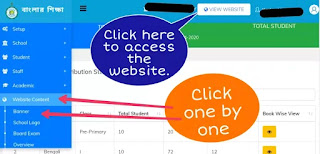
Each school has a website on the Banglar Shiksha portal. Initially most of this website is not designed. The school authorities have to design this website. How to access the Banglar Shiksha school website? Step 👇 🔴 Login with School to Banglar Shiksha SMS Portal. 🔴Click on the "View Website" option at the top of the dashboard. This blog is about how to add an Overview Content to Banglar Shiksha school website. How to add an Overview content on Banglar Shiksha School Website? Step 👇 🔴Click on the "website content" option in the Navigation menu. 🔴Click on the "Overview"  option in the "Website Content"  option. 🔴 A new window will open. Click on "Add New". 🔴 A new window will open. Enter the description as instructed in the image below.What you write in this description box will be shown on the Banglar Shiksha school website. You can follow the YouTube video below about this blog. Click...
Banner on Banglar Shiksha website

ছবি
Each school has a website on the Banglar Shiksha portal. Initially most of this website is not designed. The school authorities have to design this website. How to access the Banglar Shiksha school website? Step 👇 🔴 Login with School to Banglar Shiksha SMS Portal . 🔴Click on the "View website" option at the top of the dashboard. How to create a banner on Banglar Shiksha portal? I have already published a blog on how to add a logo to the school website of the Banglar Shiksha portal. This blog is about how to add a Slider or Banner to Banglar Shiksha school website. Step 👇 🔴 Login with School to Banglar Shiksha SMS Portal. 🔴Click on the "website content" option in the Navigation menu. 🔴Click on the "Banner"  option in the "Website Content"  option. 🔴A new window will open. Click on "Add New". 🔴A new window will open. Type Title. Type Subtitle. Upload Content. #Photo size- 30...

E-Pension for Teacher of West Bengal

ছবি
A notice regarding e-pension has been published on the iOSMS portal of the Government of West Bengal.This notice mentions the method of how retired teachers will get the benefit of e-pension.I posted that notice below. Source: iOSMS In Text: E-pension urgent (A) FOR THOSE EMPLOYEES WHO ARE GOING TO RETIRE WITH PAY AS PER ROPA-2019 All Hols/Sls are requested to update the "PERSONAL DETAILS" and "CONTACT DETAILS" of those employees who are going to retire with pay as per ROPA-2019, Those fields are available in "EDIT EMPLOYEE PROFILE (AFTER FINALIZATION)" menu under "MASTER DIRECTORY MANAGEMENT" in i-OSMS. All the updated data will be fetched to e-Pension portal from i-OSMS. The applicant will login with his/her previous ID and password to proceed further. The work flow will remain same as earlier. (B) For those employees who have retired/ died between 01/01/2016 to 31/12/2019 with e-PPO and have User ID and Password f...

Syllabus and model question of the WBSED

ছবি
Teachers create Activity Task or Assignment content on Banglar Shiksha portal using syllabus and model questions. This blog about how to download syllabus and sample/Model question and answer from the website of the  Department of School Education,West Bengal. Download Syllabus from WBSED 1.First Enter the Website WBSED 2.Click on the "Student" or "Teacher" drop down menu on the page-list below the header. 3.Click on the "Syllabus" option of these drop down menus. 4.In this Syllabus option, you will see syllabus of different classes. Follow the instructions in the image below to download the syllabus. Download Model Questions and Answers from WBSED. 1.First Enter the Website WBSED 2.Click on the "Student" or "Teacher" drop down menu on the page-list below the header. 3.Click on the "Model Q & A" option of these drop down menus. 4.In this  option, you will see the lists of Questions and Ans...

Regarding Banglar Shiksha online Classroom

ছবি
Due to the frequent lockdown, the students are facing a shortage of study.The Banglar shiksha portal , like the National Digital Library of India, is becoming an ideal classroom for students. A new addition to the Banglar shiksha portal has been helping students in this disaster.This new addition is the Banglar shiksha Classroom. How to Open the Banglar Shiksha classroom? Enter the Banglar Shiksha Portal. Banglar Shiksha Portal's Activity Task This item of Banglar Shiksha portal contains the homework for each class of students.The student who is studying the class will download the activity Task of Banglar Shiksha Classroom of that class.Students will complete these Activity Tasks at home.When the school opens, students must submit these activity tasks to the Class-Teacher. How to download the activity task of the portal? Follow the instructions in the image below to download. TV Programme (IX-X) of Banglar Shiksha Classroom The Banglar Shiksha Classroom ...